← Back to Support Anonymous11 months agoSolved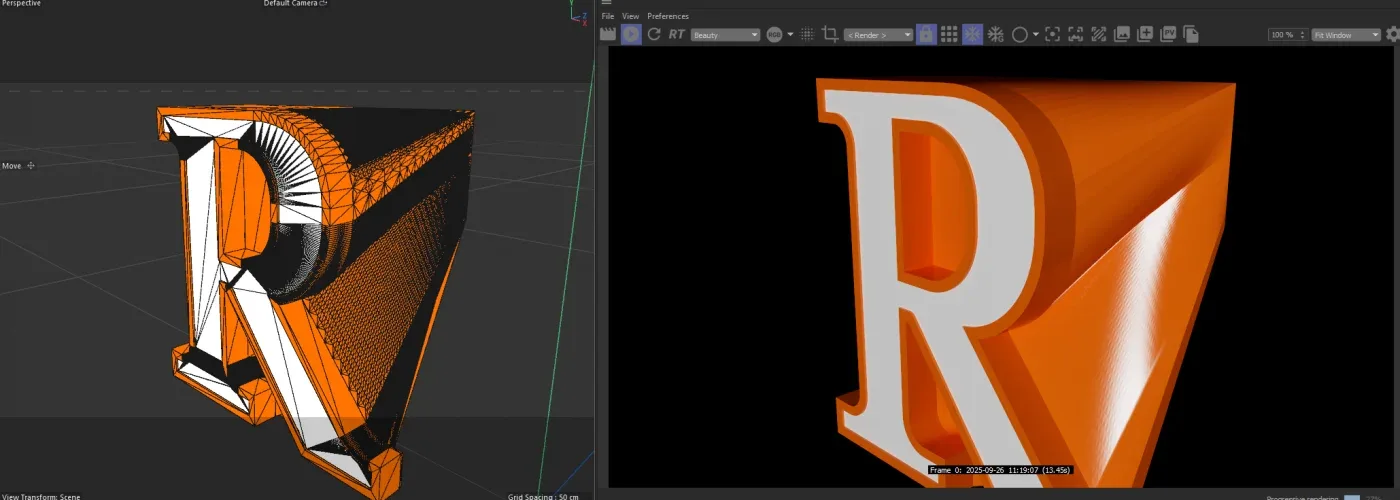
Smooth out geometry
Need some guidance. I was given this model that has two areas that need smoothening. Top Right and following down as it reached the bottom right. The front is the "R" and extrudes to the "T" on the backside... Each face as the corresponding letter "R" example... I was not given a font
308 views
Log in to join the conversation.

Hey Sam,
You could try selecting the edges of the front face in edge mode, right-click ->
Edge To Spline. Then the same with the back face, then use theLoft Modifierto recreate a cleaner version of the shape (basically remake it).Or you could use the two spline edges you created as guides in a
Remeshto get cleaner geometry.If permitted, you could send it to me and I'll have a crack at it when I get the chance.